Developing and publishing an app on the App Store: the Social AI Hub case, from web app to iOS
We brought Social AI Hub, the AI-powered management platform we develop, to the official App Store: Apple's rules, in-app purchases, real costs and timelines — and what it teaches anyone who wants an app or automation for their business.
There's a precise moment when a web platform stops being "a site that also works on a phone" and becomes a product that lives in its users' pockets. For Social AI Hub, the AI-powered management platform for appointment-based businesses that we design and develop, that moment came with the publication of the official app, Social AI Hub – Gestionale, on the Apple App Store: free download, Sign in with Apple and Google, subscriptions handled directly by Apple.
In this article we tell the whole story — why bring a web-based management platform to iOS, how the app works, which Apple rules we had to comply with, real costs and timelines. It's not just the story of one of our products: it's a practical guide for anyone with a platform, a SaaS or an idea who is wondering what it really takes to get onto the official store.
From web platform to iOS app: why
Social AI Hub was born as a web platform: a management tool designed for beauticians, hairdressers, medical practices, personal trainers and, in general, anyone who works by appointment. The heart of the product is automatic WhatsApp and email reminders — sent 1-3 days before the appointment, they cut no-shows by up to 70% — alongside a calendar synced with Google Calendar, a client CRM, AI-powered replies to social media comments and a dashboard with the business's KPIs. All of it on a modern stack (Next.js, NestJS, PostgreSQL) with GDPR-compliant European servers.
And that's exactly the point: the audience of a salon management tool doesn't sit in front of a computer. They're in the treatment room, behind a counter, on the floor. The smartphone isn't a secondary channel: it's the primary work tool. From this observation — backed by usage data from the web platform, where the share of mobile sessions grew month after month — came the decision to build a native app. The reasons, in order of importance:
- The calendar in your pocket — opening the app, seeing today's appointments and logging a payment must take seconds, not a browser login. The app removes daily friction, and in management software daily friction decides who stays subscribed and who cancels.
- Perceived trust — a business that entrusts its calendar and revenue to software wants guarantees. Being on the App Store means having passed Apple's review, having a public listing with ratings and a verified developer: for a small business owner, that's reassurance no landing page can provide.
- Frictionless subscriptions — with in-app purchases the user subscribes with Face ID in two taps, and the management side (renewals, cancellations, billing) is handled by Apple. Fewer steps, fewer drop-offs at the most delicate moment: payment.
- One more acquisition channel — the App Store is a search engine in its own right: someone searching for "salon management" or "appointment calendar" there is an extremely high-intent user that a web-only presence never intercepts.
What the Social AI Hub – Gestionale app does
The app is called "Social AI Hub - Gestionale", it's free to download, requires iOS 15.1 or later, weighs about 38 MB and runs on iPhone and on Macs with Apple Silicon. It's built for everyday operational work:
- Smart calendar — the day's and week's appointments at a glance, with quick creation and editing designed for someone with busy hands and thirty seconds between clients.
- Automatic WhatsApp reminders — the platform's signature feature: the system sends reminders to clients before their appointment, without the owner having to remember to do it. Fewer last-minute cancellations, fewer gaps in the calendar.
- Integrated client records — client profiles with appointment history and notes, ready to check right before a treatment.
- Revenue tracking — logging and monitoring takings directly from the app, to keep a finger on the pulse of the business even at the end of the day.
- Sign in with Apple and Google — native one-tap login, no passwords to remember.
- Subscription directly in-app — plans can be purchased from the app through Apple's secure purchase flow.
The technical journey: how the app was built
The temptation, when you already have a working web app, is to "wrap" it in a webview and ship it to Apple. It doesn't work: the App Review Guidelines (4.2, "Minimum Functionality") explicitly reject apps that are mere repackaged websites. To get onto the store you need real native value. The path we followed:
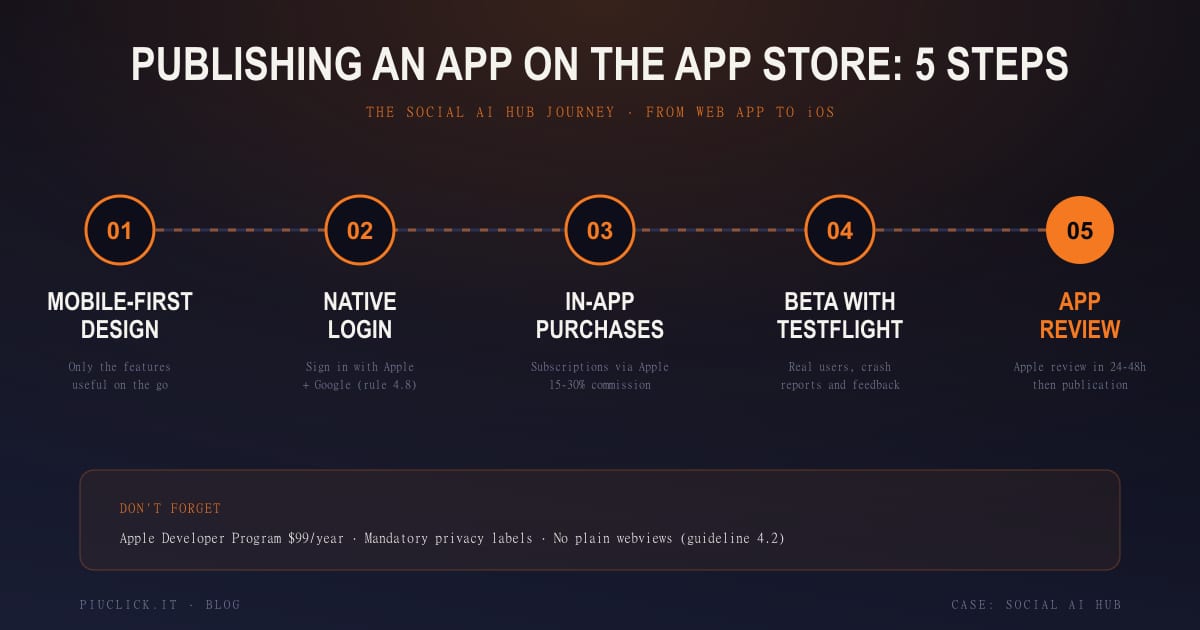
- Mobile-first experience design — first question: what does a beautician with a phone in hand actually need between appointments? The answer defined the app's scope (calendar, clients, takings, reminders) and left to the web what people use while sitting down.
- Native authentication — sign in with Google and with Apple. Not a free choice: guideline 4.8 requires that if you offer third-party login, you also offer Sign in with Apple or an equivalent privacy-protecting option.
- In-app subscriptions — the platform's plans (Reminder Lite, Pro, Business and Unlimited) were brought into Apple's purchase system: subscribe with Face ID, with renewals and cancellations managed through the user's Apple account.
- Beta testing with TestFlight — before publication, the app went through TestFlight, Apple's official tool for distributing beta builds to real users and collecting crash reports and feedback.
- App Store Connect and submission — product listing, screenshots in all required formats, description, keywords, privacy labels (the "privacy nutrition labels" declaring what data the app collects) and submission for review.
The work doesn't end with the first release: every update goes through review again. Version 1.1.0, for example, introduced Sign in with Apple and Google, in-app registration and secure subscription purchases through Apple — three features that turned the app from a simple companion into a complete entry point to the platform.
Apple's rules: review, login and in-app purchases
Anyone who wants to publish an app has to reckon with the App Review Guidelines: a long, continuously updated document that every app must comply with in full. Three rules in particular directly affect anyone bringing a subscription platform to the store, as we did:
On top of these come the mandatory privacy labels — the public declaration, visible on the app's listing, of what data is collected and how it's used — and the aforementioned guideline 4.2 on minimum functionality. The common thread is one: Apple treats the store as a shopfront it personally vouches for, and the review exists to protect the end user. Understanding this before you start saves weeks of back and forth.
How much it costs and how long it takes
The honest numbers, for anyone considering the same step. The fixed entry cost is the Apple Developer Program membership: $99 a year, required to publish. The real cost is development: for an app like this one — native authentication, in-app purchases, synchronisation with an existing platform — you're looking at weeks or months of work depending on complexity and on how well structured the existing backend is. If the web platform already exposes clean APIs, as in Social AI Hub's case, timelines shorten considerably.
The part nobody budgets for is the preparation: certificates and provisioning profiles, screenshots in every required format, listing copy, a GDPR-compliant privacy policy, in-app product configuration on App Store Connect, beta testing. It's low-visibility work that weighs more than the review itself. The practical advice: treat publication as a project in its own right, not as the "last mile" of development.
Bringing Social AI Hub to the App Store wasn't a technical exercise: it was a trust upgrade. For a beautician who entrusts her business's calendar and takings to software, finding the app on the official store, with payment handled by Apple, is worth more than any marketing page. Technology has to earn trust, and the store is where trust becomes visible.
— Niccolò Giuseppetti, founder of +Click and developer of Social AI Hub
What changes for Social AI Hub users
For businesses already on the platform, the app means the management tool is always in their pocket: the calendar gets checked between clients, takings get logged from the sofa at the end of the day, and WhatsApp reminders keep going out on their own, as always. For those not yet using it, onboarding is as simple as it gets: download the app for free, register in-app with Apple or Google and start — the subscription only kicks in when needed, directly from the app.
For us at +Click, this project closes a circle: the same team that develops the web platform — and that builds websites, management tools and AI automations for clients every day — now also covers the native mobile channel. It's the natural evolution of an approach we often write about on this blog, from AI marketing automations to customer service chatbots, all the way to the WhatsApp Business API that powers Social AI Hub's reminders.
Custom app development and business automation
Social AI Hub is our product, but the method behind it — analysing the real process, developing for web and mobile, automating away manual work — is the same one we apply to client projects. And the question we hear most often from Italian SMBs is no longer "how much does a website cost?": it's "how do I stop losing hours to repetitive tasks?". Custom software development and business process automation answer exactly that question:
- Custom management tools and web portals — bookings, quotes, client areas, inventory: when spreadsheets and off-the-shelf tools can no longer keep up with the business, a web application built around its real processes gives back hours every week and finally reliable data.
- Automation of repetitive processes — automatic WhatsApp and email reminders (the same technology driving Social AI Hub's reminders), follow-ups on unanswered quotes, internal team notifications, synchronisation between CRM, calendar and invoicing: n8n flows and API integrations that work while the business takes care of its customers.
- AI applied to daily work — automatic replies to comments and reviews, chatbots for first contact and request triage, generation of recurring documents: AI makes sense when it removes a measurable bottleneck, not when it's a demo to show off.
- Mobile apps when they're truly needed — not every business needs an app; when the team or the customers work on the move (field technicians, sales agents, appointment-based businesses), the native app is the piece that completes the platform, exactly as in Social AI Hub's case.
Hippolife is the second product we took from idea to store with the same method: a multilingual website, a web app on our own backend and an iOS/iPadOS app published on the App Store, all built in-house. The full case study walks through the entire chain, from the product brief to Apple review.
The criterion we use, for our own products as for our clients', is always the same: start from the process, not from the technology. First map how the business actually works, then find where time or customers are being lost, and only at the end choose the tool — web app, automation, AI or native app. That's why every project starts with measurable goals: hours saved, no-shows reduced, quotes answered faster. If the number doesn't improve, the software wasn't needed.
Checklist: is your platform ready for the App Store?
- Does your backend expose clean, documented APIs that a native app can consume?
- Have you identified the 3-4 features that genuinely make sense on mobile (and left the rest on the web)?
- Does your authentication flow include Sign in with Apple alongside other providers?
- If you sell subscriptions, have you budgeted for Apple's 15-30% commission and defined your in-app pricing strategy?
- Are your privacy policy and data processing in order and ready for the listing's privacy labels?
- Have you planned a beta testing phase with TestFlight before publication?
Frequently asked questions
How much does it cost to publish an app on the App Store?
The fixed cost is the Apple Developer Program membership: $99 per year. The real cost is development, which for an app connected to an existing platform ranges roughly from a few thousand euros for a lean MVP to tens of thousands for a complete product with in-app purchases and data sync. At scale you also need to account for Apple's commission on subscriptions sold in-app: 30%, or 15% with the Small Business Program under one million dollars in annual revenue.
How long does Apple's review take?
Apple states that the vast majority of apps are reviewed within 24 hours, and in our experience 24-48 hours is a realistic window. The real point is another: on a first release it's normal to receive one or more rejections over details to fix (privacy labels, purchase flows, metadata). Plan the publication with at least two or three weeks of buffer before any communication or launch deadline.
Can I turn my website into an app?
Not by wrapping it as-is: Apple's guideline 4.2 rejects apps that are simple webviews of a website. You need native value — system login, notifications, mobile-specific features, in-app purchases. The good news is that if your web platform is well built, with APIs separated from the front end, most of the logic can be reused and the app becomes a project of weeks, not years.
Is the Social AI Hub app free?
Yes, the download is free and registration happens directly in-app with Apple or Google. Features are unlocked with subscription plans — from Reminder Lite up to Unlimited — available both on socialaihub.it and directly in the app through Apple's secure purchase flow. The web platform also offers a Free plan to start without a credit card.
What's the difference between the iOS app and the web version of Social AI Hub?
Same account and same data, different roles. The iOS app covers daily operations: calendar, clients, takings, reminders. The web app remains the complete control centre, with the analytics dashboard, AI replies to social comments, project board and content scheduling — and being web-based, it works from any device, Android included.
Do you have a platform or an idea to bring to the App Store?
We build web apps, management platforms and iOS apps: from experience design to store publication, through native login, in-app purchases and Apple's review. Tell us about your project and we'll give you an honest picture of costs, timelines and requirements — just like we did with Social AI Hub.
Let's talk